The workbench, recorded
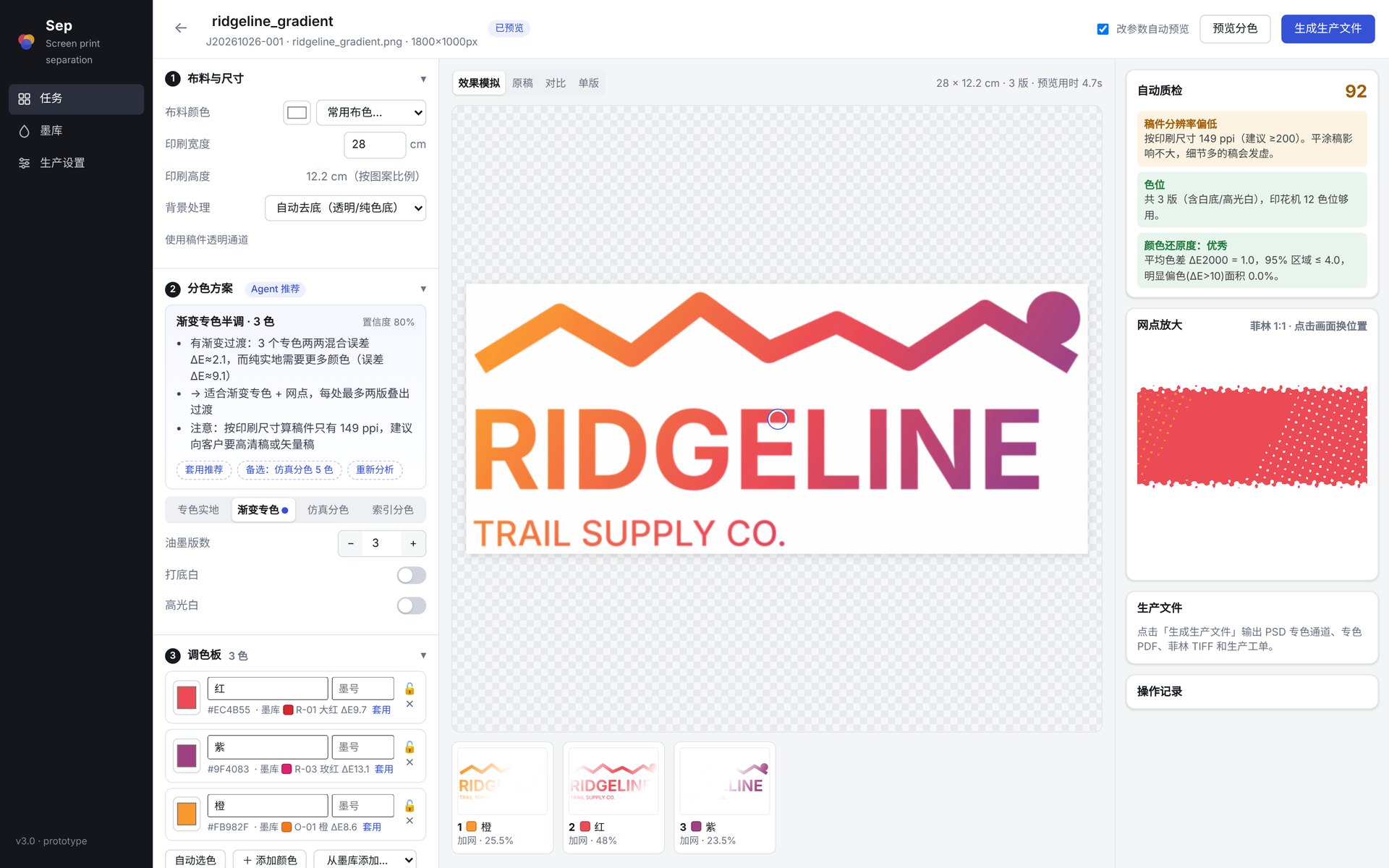
Real interface, real pipeline, synthetic artwork made for this demo. Drop a file with the fabric colour and print width; the agent analyses the art, recommends a mode and plate count with reasons; preview the separation; export the production files.
What comes out
Each export is a versioned folder. The films below are the actual one-bit TIFFs from the illustration job: registration marks, a dot-gain scale, and a label with job, plate, ink, line frequency and mesh.

The file set
- Spot-channel PSD — one spot channel per plate, named print order + ink + code, coloured with the ink colour, so a RIP or Photoshop can screen it with the shop's own parameters.
- Separation PDF — each plate a /Separation object with overprint, opened in Illustrator or Acrobat, sent straight to a RIP.
- Films — pre-screened one-bit TIFFs, ready for the film printer, mirrored if the shop exposes that way.
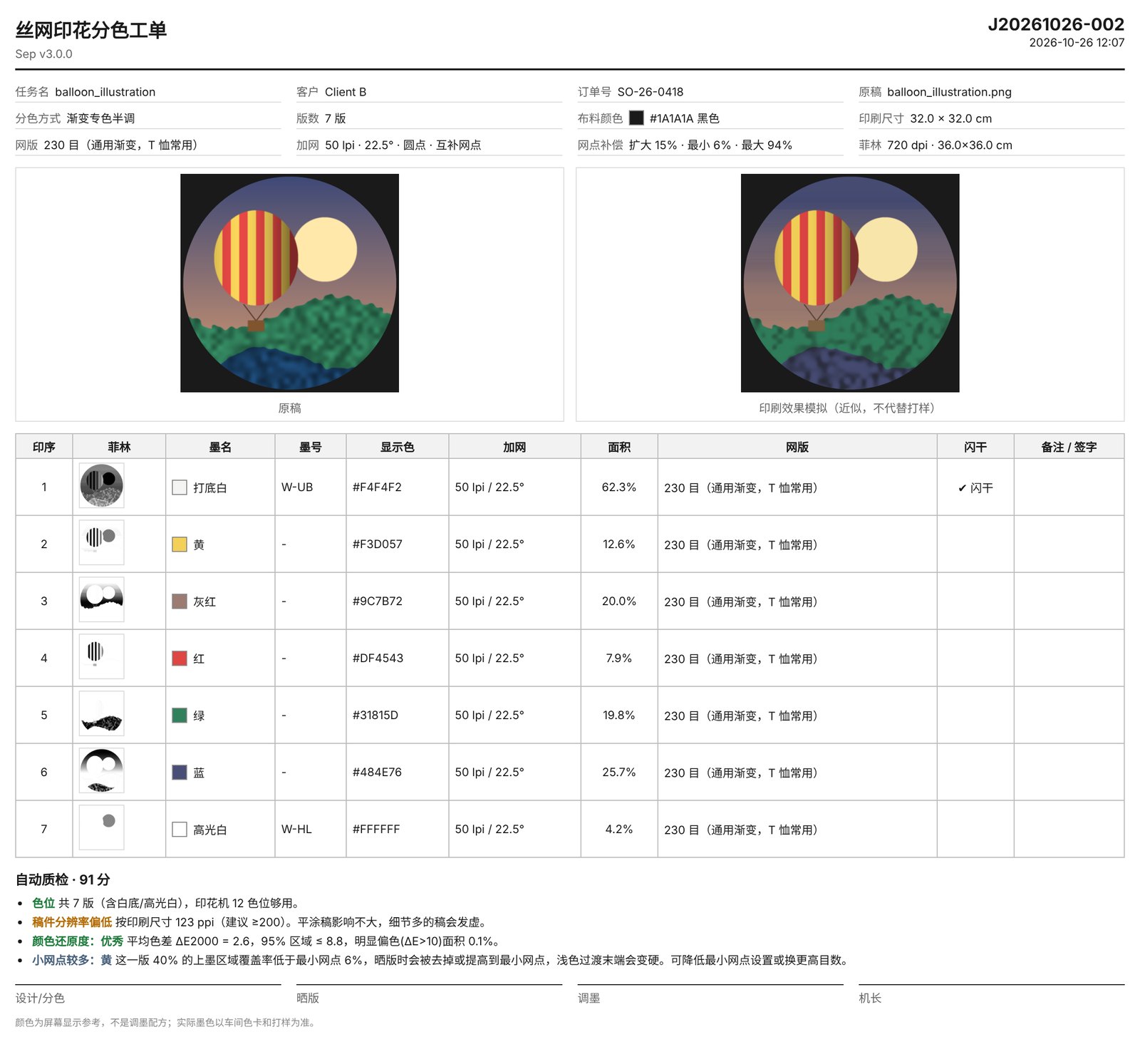
- Ticket — the HTML above.
- Simulation PNG and manifest.json — every parameter, palette entry and quality result, machine-readable for an ERP or MES.
The PSD, PDF and TIFF writers are written from scratch on top of numpy — no imaging library with licensing strings attached, and every byte of a spot channel or a Separation colour space is under control.
Under the hood
Two data structures carry the whole system: Artwork, what was read in, and Separation, the plates that came out. A new input format touches only the loader; a new output format reads only a Separation; a new mode is one branch in the separator.
Four modes, one separator
- Solid spot — logos and flat art: one 100% plate per ink, automatic trapping.
- Gradient spot halftone — a few spot inks with blends: at most two plates carry ink at any point, so transitions stay clean.
- Simulated process — photographs and complex illustrations, especially on dark fabric: soft decomposition plus underbase and highlight white.
- Index — many bright colours, loose registration: square diffusion dots, one ink per cell.
The decomposition
Each ink with the fabric colour forms a segment. A pixel is projected onto every segment in Yule–Nielsen space (reflectance to the half), the residual is measured in Lab, and a softmin weights the segments. Adjacent plates sum to 100%, and no pixel needs more than two inks — which is what a press can register.
Choosing inks
Candidates are k-means centres, the most saturated colour in each hue band, and the darkest and lightest pixels. Inks are added greedily on reconstruction ΔE, swapped to improve, then pushed outward toward the pixels they alone explain, so gradient endpoints do not go grey. The same error curve suggests the plate count: stop when one more plate buys less than 1.5 ΔE.
Dark fabric
Underbase is the sum of each plate's coverage times the white that ink needs — 100% under light inks, 35% under dark — then eroded in greyscale so it never peeks out. Solid mode uses the binary union, choked.
Screening
A 256 × 256 ranked threshold matrix: coverage equals the black area it produces, and each film pixel samples coverage bilinearly, so edges stay crisp. Complementary dots share one grid across plates; print order assigns each plate a band of thresholds in the same cell, so plates do not stack, and the gain curve is applied to cumulative coverage.
What the agent is allowed to do
Recommend, with reasons. Every parameter stays editable; a plan — from the rule advisor today, from a model later — must pass validation against the press's stations and mesh presets before it is applied. The interface shows the recommended mode with a dot, not a lock.
Runtime, as recorded
On the synthetic jobs in the recording, running in a cloud container: three-plate preview at 28 cm in 4.7 s; seven-plate preview at 32 cm in 12.4 s; the full seven-film export at 720 dpi in 151 s. Core dependencies are numpy, Pillow and pypdfium2; it runs on a Mac by double-click.
Decisions that shaped it
Where it started: the gradient script
The first version was a Photoshop script that split a linear gradient into complementary spot plates at a line frequency matched to the mesh. The algorithm runs here in the browser on a synthetic gradient; the workbench above generalises it to arbitrary artwork.
Coverage per plate — black is 100% ink
Halftone plates — shown at 4× magnification, angles stepped by 30° to limit moiré
What software can validate, and what only a press can
A separation is a prediction about ink on cloth. Some of that prediction can be checked on a screen; the rest is physics and has to be checked on a strike-off. Knowing which is which is the difference between a tool and a toy.
Geometry, colour math and files
- ΔEThe simulated print against the artwork, per pixel and in aggregate, in Lab with ΔE2000.
- platesPlate count, at most two inks per pixel, coverage per plate, trap width, underbase choke.
- screenDot structure from the ranked threshold matrix: no dot below the printable minimum, no moiré between angles.
- filesThe production set opens where it must: layered PSD with spot channels, one-bit films at output resolution, the ticket and manifest.
- regressThe same artwork separates the same way every run; a change is a diff, not a surprise.
Ink, mesh, fabric and hands
- gainReal dot gain on this fabric with this mesh and squeegee: the tone curve in the tool is a model until it is measured.
- opacityHow much an ink hides the ground, and therefore whether the white underbase is enough, too much, or wrong in places.
- orderPrint order and flash between colours: trapping that is correct on screen can still smear or lift.
- specialsPuff, metallic, high-density and discharge inks behave in ways the simulation does not attempt.
- eyeWhether the operator, holding the strike-off next to the artwork under shop light, accepts it.
The next step is therefore not more features: it is one real order through the pipeline with the operator's feedback closing the loop, and the measured tone curve written back into the tool.
Status, honestly
Roadmap, as planned
- Native vectors: read spot colours and paths from AI/PDF, output vector-edged plates.
- PSD layers and existing spot channels, so customer-separated files can be checked rather than redone.
- Colour management: measured ink and fabric Lab from a spectrophotometer; calibrate the print model against proofs.
- A model-backed advisor behind the same validation gate: analysis JSON and thumbnail in, plan JSON out, never beyond the press's constraints.
- Multi-user deployment: accounts, design → review → exposure hand-offs, database-backed job library, audit log.